
Questions on product def's, version numbers and check for updates

Hi, John.
We’re moving forward with our implementation of QLM and I have a few questions.
To give you a little background, we are using the subscription license model and including maintenance with the subscription (versus offering it separately). So when we set up a subscription license on the QLM server, we set the subscription expiry date and the maintenance plan expiry date to same date. When a subscription is renewed, we also extend the maintenance plan expiry date.
We are also going to use the QLM “check for update” feature.
I setup up a product definition for each of our products. So each has a Product ID and major/minor version numbers.
My questions are related to product definitions, version numbers and the “check for updates” feature:
- Do you recommend that the version numbers have just 1 decimal to separate the major and minor versions? For example 2.0 would be major version 2 and minor version 0. How are the decimals in the version number treated? Our programs currently have 3 decimals like 2.0.0.2, but we really only use the first and last numbers and I can change how we set the version numbers on our apps, if needed.
- When I issue a MINOR version update, do I just update the Latest Version tab of the existing product definition with the new version number of the minor update, the url and release notes? Or do I need to create a new product definition using the “new version of existing product” option? Your article says “…to upgrade the version of a product, you should NEVER modify the version directly. Instead, you should create a new version, leaving the old one untouched.”
- For a minor version update, if I only need to update the Latest Version info in an existing product definition, then when would I create a new product definition using the “new version of existing product” option? Only when issuing a new MAJOR version update?
- When our app checks for updates and gets the Latest Version info, will it always get the Latest Version info from the highest-version product definition where the highest version product definition was created as a “new version of an existing product”? For example, assume a user is running Product ID 1 version 3.0, and there are three product definitions on the server for Product 1: versions 3.0, 4.0 and 5.0, where 4.0 and 5.0 were created using the “new versions of an existing product” option. When our 3.0 app checks for updates, will it automatically get the Latest Version info from the 5.0 product definition.
Thanks for your answers.
Matt Shipley
MoneySoft, Inc.
-
Official comment

Hi Matt
- Do you recommend that the version numbers have just 1 decimal to separate the major and minor versions? For example 2.0 would be major version 2 and minor version 0. How are the decimals in the version number treated? Our programs currently have 3 decimals like 2.0.0.2, but we really only use the first and last numbers and I can change how we set the version numbers on our apps, if needed.
> The version number is expected to be of the form: MajorVersion.MinorVersion
- When I issue a MINOR version update, do I just update the Latest Version tab of the existing product definition with the new version number of the minor update, the url and release notes? Or do I need to create a new product definition using the “new version of existing product” option? Your article says “…to upgrade the version of a product, you should NEVER modify the version directly. Instead, you should create a new version, leaving the old one untouched.”
> It depends. Say your current release is 1.4 and you are about to release 1.5. If you want all your 1.4 customers (regardless of the maintenance plan) to be able to upgrade to 1.5, then do not update the Minor version in QLM to 1.5. Just update the Latest Version to 1.5.
- For a minor version update, if I only need to update the Latest Version info in an existing product definition, then when would I create a new product definition using the “new version of existing product” option? Only when issuing a new MAJOR version update?
> See answer above.
- When our app checks for updates and gets the Latest Version info, will it always get the Latest Version info from the highest-version product definition where the highest version product definition was created as a “new version of an existing product”? For example, assume a user is running Product ID 1 version 3.0, and there are three product definitions on the server for Product 1: versions 3.0, 4.0 and 5.0, where 4.0 and 5.0 were created using the “new versions of an existing product” option. When our 3.0 app checks for updates, will it automatically get the Latest Version info from the 5.0 product definition.
The GetLatestEligibleVersion API will determine, based on the customer's maintenance plan expiry date and the Release Date of each version, the highest version that the customer is entitled to and return that version.
Regards
John
Comment actions -
Hi, John.
In your answer, you said that if I want all users to have access to a Minor version update, regardless of maintenance status, then just update and increment the Latest Version in the existing product definition.
However, we are going to require that the maintenance plan is active in order to access minor version updates. Therefore for each minor version update, I'll need to create a new product definition based on the existing definition. In the new product definition, I'll increment the Minor version number, keep the major version the same, update the Release Date. Is this correct? Do I need to create a new product definition for Major version updates?
Thanks,
Matt Shipley
-
However, we are going to require that the maintenance plan is active in order to access minor version updates. Therefore for each minor version update, I'll need to create a new product definition based on the existing definition. In the new product definition, I'll increment the Minor version number, keep the major version the same, update the Release Date. Is this correct?
> Correct.
Do I need to create a new product definition for Major version updates?
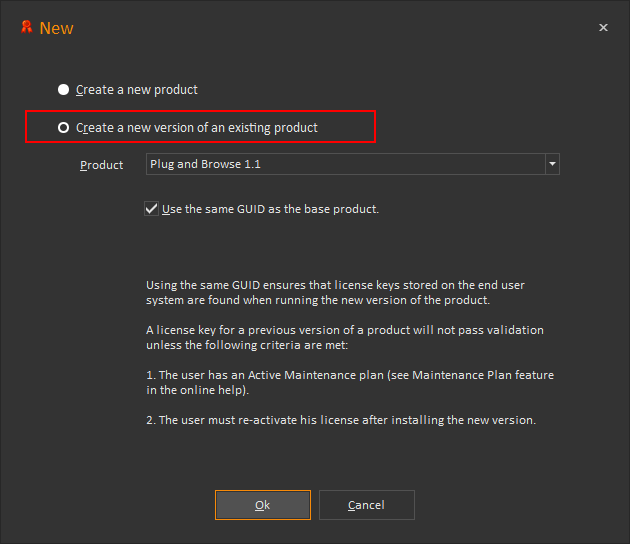
> You do. Just make sure that whenever you create a new product definition, both for minor and major updates, you select the option to "create a new version of an existing product" and you check "Use the same GUID as the base product".
Please sign in to leave a comment.
Comments
3 comments