
Can I create a license for a particular PC?

I wonder if this is possible.
Can I create a license for a particular PC?
For example, If the end user gives a fingerprint for pc, we generate a license key for that information.
And the PC activates the license permanently.
Is this possible?
-
Official comment

Yes, of course. Each license that you create can be bound to a specific computer.
The fingerprint of the computer can be a computer name, mac address, volume serial number, motherboard SN, etc. or you can define your own.
Comment actions -
How can I get the fingerprint from the customer? Do you have any applications or examples?
Let me explain the situation in more detail.
Customer's PC is not connected to the internet and I want to make license key with customer's pc information.Only the key should be activated on the customer's PC.
-
I referred to the article on the below.
https://support.soraco.co/hc/en-us/articles/207989423-What-is-online-license-activation-
Offline activation is typically done by asking the user to send his activation key along with the computer identifiers (the application should display to the user the computer identifiers) by fax, phone or email. Upon receipt of this information, the vendor generates a Computer Key on the customer's behalf and sends it back to him. The customer then enters the Computer Key and enables the software to run.
-> " the application should display to the user the computer identifiers"
Do you have an application or an example that will notice the customer to their computer id?
The computer id I mean is not just a user name but a computer-specific number and information.
-
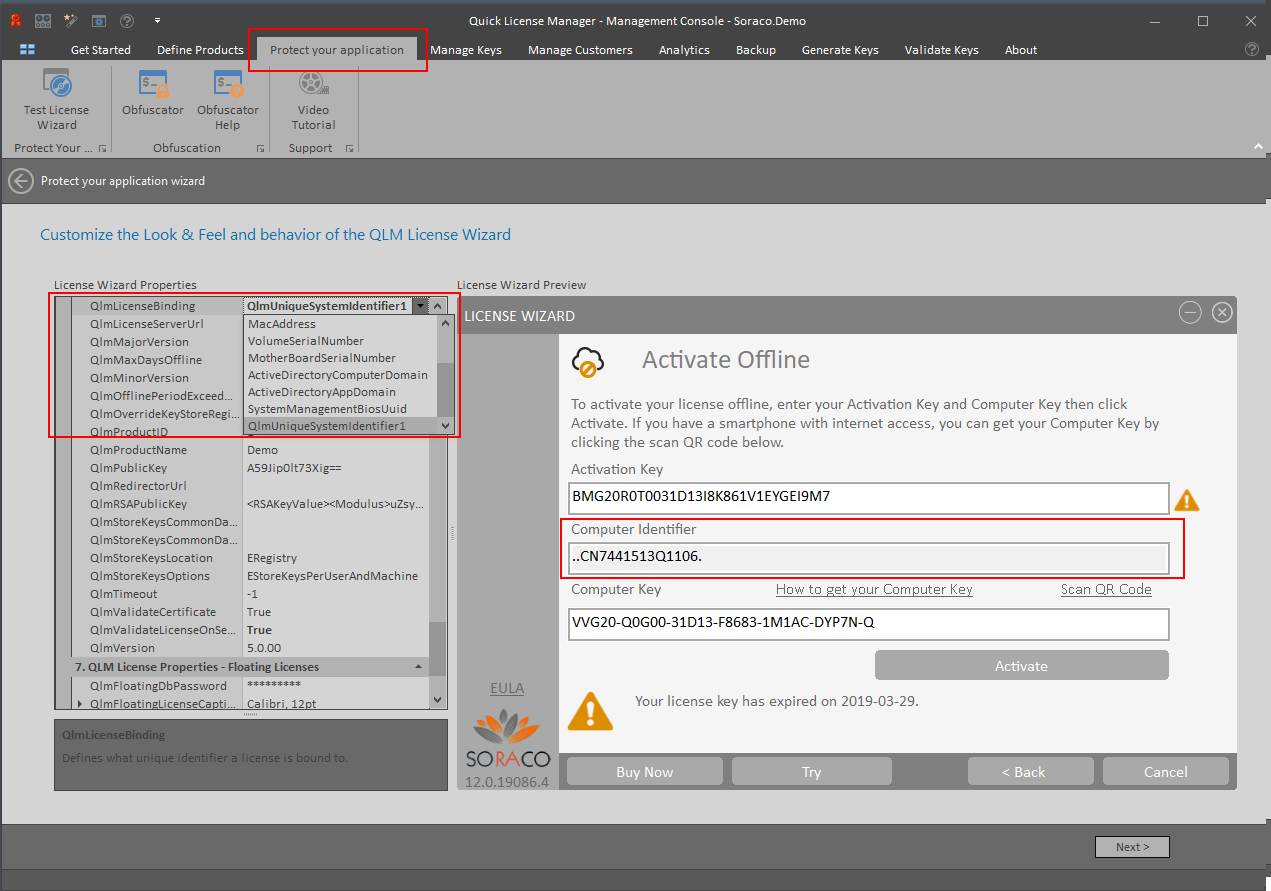
If you are using the QLM License Wizard, you just need to set to QlmLicenseBinding property to any value of your choice (ComputerName, MacAddress, etc). The QLM License Wizard will then display the fingerprint.
We do recommend setting the QlmLicenseBinding property to QlmUniqueSystemIdentifier1.
If you are not using the QLM License Wizard, you can use the QlmHardware class to retrieve a fingerprint from the customer's system.
Please sign in to leave a comment.
Comments
4 comments